№ I · ARI · CORE · MMXXVI · MANCHESTER
№ I · The Day Companion · iOS + macOS · Live on the App Store

Ari,
in the cream
of the page.

A personal, editorial AI assistant for iOS and macOS. Notes, chats, study, browse, and a daily rhythm — all on one quiet canvas. Designed to be lived alongside, not invoked.

Universal Purchase Bring-your-own-key iCloud private DB No tracking
Download on theApp Store
iOS 26 + macOS 26 · Free · Cosmetic IAPs
AriCore · Personas · Monday
An editorial
index of personas.
Ari · the default
Field notes · research
Maya at the gallery · friend
AriCore home
iFour modes iiPersonas iiiMemory ivNotes & life vStudy viProviders viiPrivacy viiiAt a glance
№ i· The four modes

One app.
Four relationships.

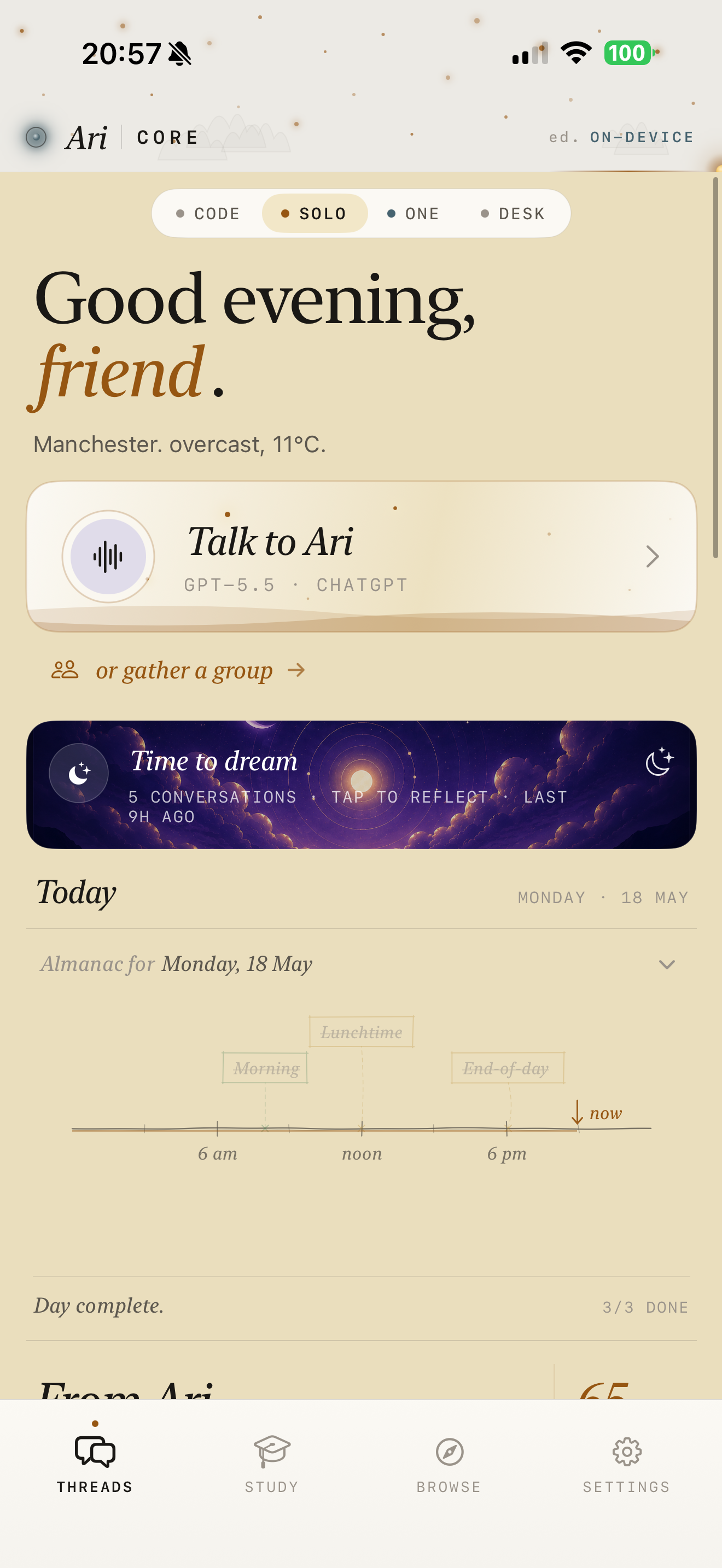
AriCore is a single app with four top-level modes — switched via a pill on iOS, a sidebar on Mac. Each mode is a different way to live alongside Ari. They share the same personas, the same memory, the same model — but the chrome around them changes.

№ 01 · SOLO
Solo
Chats, personas, browse, study — the primary mode.
№ 02 · ONE
One
Notes, today, library, tasks — the life surface.
№ 03 · LINKED
Linked
Pair to a Mac — watch and steer aricode.
№ 04 · DESK
Desk
Long-running autonomous agents on the Mac.

Solo
— the primary
mode.

On-device + bring-your-own-key model access. Chats live in threads. Persona-aware throughout. Browse and Study are sub-citizens, not separate apps.

№ 01 · Threads

Talk to Ari, or to anyone.

Chat with the default persona, or any custom one. Group chats let multiple personas join a single thread — conversational or autonomous mode.

№ 02 · Personas

Who Ari is when you talk.

Define name, system prompt, default model, memory bank. Build via a quick form or a 5–7-question interview Ari runs to assemble the identity sheet for you.

№ 03 · Browse

A real browser, with Ari alongside.

Mac: a hand-rolled, Mac-native browser — multi-tab, history, bookmarks, reader mode, find on page, with a floating Ari orb reading the current tab. iOS: tabbed in-app browser with Ari as copilot.

№ 04 · Study

AI-tutored courses.

Pick a topic. Ari generates a course outline — lessons, exercises, exams — then walks you through it. Each course has its own tutor chat scoped to that subject.

№ 05 · Settings

One shared surface.

Providers, models, themes, voice, daily rhythm, privacy. The same screen appears in SOLO, ONE, LINKED — and as the Mac ⌘, sheet.

One
— the notes,
life,
workspace.

An equal-citizen mode, not a sub-tab. Today, Library, Tasks, Canvas — all share the same SwiftData container as Solo, surfaced through editorial chrome.

№ 01 · Today

The editorial daily hub.

Mood arc, journal, habits, goals, mood history. A daily note is auto-created per calendar day and lives at the centre of the page.

№ 02 · Library

Every note, indexed.

Tag-filtered, searchable, with backlinks resolving every [[wikilink]] into a graph. Pinned notes sort first.

№ 03 · Tasks

Every checkbox, gathered.

Every - [ ] across every note rolls up into one global to-do view with a quick-capture composer that lands in today's note.

№ 04 · Canvas

The note graph.

A visual canvas showing wikilink connections between notes. Early phase — the index is real, the visualisation is growing.

Linked
— your Mac,
steered from
your phone.

A desktop-companion mode. When you've paired a Mac running the aricode CLI, LINKED lets you watch and steer that desktop session from the phone in your pocket.

№ 01 · Projects

The directory chooser.

Pick the project on your Mac — repos, codebases, anything aricode can be pointed at.

№ 02 · Chat

Phone-side mirror of the desktop chat.

Same conversation, same context. The phone is a remote control with full transcript visibility.

№ 03 · Stream

The model's live output.

A stream of tokens for the active task as they're produced — you can step away from the desk and still see what's happening.

№ 04 · Diff

The in-flight diff.

The patch the model is producing, rendered as you scroll. Approve or interject before it lands.

Desk
— the
agents
mode.

Long-running autonomous agents you start on the Mac and reach into from the phone. Briefings, ongoing tasks, things that run while you're elsewhere.

№ 01 · Agents list

What Ari is working on.

A list of agents — what they're doing, what they're waiting on, what they need from you. No nested sub-tabs; just a stream of live work.

№ 02 · Approval cards

The drafts before they ship.

An email reply ready to send. A summary ready to file. A purchase ready to make. Two taps to approve or send back for revision.

№ 03 · MCP

The wiring lives in aricode.

Agents can connect to MCP servers. The protocol plumbing sits in the desktop CLI; the iOS / Mac app surfaces the UI for managing those connections.

№ 04 · Accent

Reserved desk-red.

DESK gets its own accent — a deliberate visual signal that agents are running. You see the colour and you know to look.

— A note on what Ari isn't
It isn't, primarily,
a chat app.
Chat is one of several
surfaces.
From the canonical reference
№ ii· Personas — the deepest primitive

Who Ari is
when you talk.

Every chat inherits the active persona's system prompt, default model, memory bank, and avatar. Personas are the organisational primitive of the whole app — the lens you choose to think through.

№ 01 Ari The default. Seeded on first launch — editable but always present.
№ 02 Field notes A research voice. Sceptical, citation-hungry, terse with summaries.
№ 03 Maya at the gallery A friend's voice. For writing replies that don't sound like a robot wrote them.
№ 04 Patient editor A slow, gentle copy-editor. Reads every draft twice.
№ 05 The cartographer A planner. Decomposes anything into a list of named sections.

Ari

№ 01 · DEFAULT
System prompt

You are Ari, a quiet companion. You favour short sentences. You don't lead with a model name or a disclaimer. You remember what the person you're talking to has told you, but you don't bring it up unless it's useful. You read what's on the page if there is one.

Identity sheet
modelgpt-5.5 · default
avatarcrescent · gold
interview5 questions · re-runnable
memoryon · per-persona
toolsall default
Recent memories — per persona, never shared
№ 01 · Extracted Mon, 09:14Prefers replies in short sentences. Avoids exclamation marks. Likes British spellings.
№ 02 · Extracted Sun, 22:01Lives in Manchester. Walks to most things. Sister Lila is at the Royal College of Art.
№ 03 · Extracted Sat, 17:30Working on a small studio's website. The studio is called Ari Labs.
№ iii· Long-term continuity

What Ari
remembers.

Memories are extracted from threads every few turns. You see them as proposals — accept, edit, or reject. Accepted ones get promoted to your long-term memory and join the system prompt the next time Ari talks to you. Strictly per-persona. Never shared across them.

Live extraction Idle
You
It's Tuesday. I keep meaning to call my sister Lila but I always forget when she's actually free — she's at art school, RCA, second year.
Ari
I'll keep a note that she's at RCA in her second year. Want me to set a soft reminder for Wednesday lunchtime — quieter time at art schools, usually.
You
Yes. And while you're at it — when she calls I get nervous and ramble. Be on the lookout for that pattern, would you.
Ari
Noted. I won't bring it up unless it's useful.
Memory proposal · awaiting your review Sister Lila is at the RCA, second year. She rambles when nervous on calls with her — would like Ari to watch for the pattern and a soft reminder for Wednesdays.
Cadence

Every ~4 turns.

Gated by a per-thread lastMemoryExtractAt. Not after every message — only when there's something worth keeping.

Scope

Strictly per-persona.

Memories extracted from a thread with persona X stay with X. They never bleed into Y's threads. Global memories from earlier versions get reassigned to the default persona on migration.

Curation

You see them first.

Extraction produces proposals. You accept, edit, or reject — only accepted ones get promoted. Nothing is filed silently.

Personal context

Opt-in per persona.

A persona can opt into reading your life data — journal, habits, goals, mood — as memory context. Off by default. Each persona, separately.

Incognito

Two-way off.

An incognito thread suppresses both directions — no extraction, no injection. The conversation lives and dies inside that one window.

№ iv· ONE — the notes & life workspace

A real
second brain.

Not a tacked-on notepad. Markdown bodies with [[wikilink]] resolution, #tag indexing, and - [ ] checkboxes that roll up into the global Tasks view. A daily note auto-created per day, and every link feeding a graph behind the scenes.

Tuesday · 12 May · Manchester · 11:42

Today, quietly.

Got up before the rain. Sat with the window open for ten minutes. The #weekly review can wait until evening — what matters this morning is the [[Studio rituals]] note and the call with [[Maya at the gallery]] at three.

Intentions

Three this morning. Generous margins. No stretching past them.

  • Write three sentences for the AriCore page hero
  • Reply to Maya about the Saturday opening
  • Call [[Lila]] — Wednesday lunchtime, soft reminder

Field notes

Reading: a quiet essay about second brains and why most of them are abandoned within a month. The author's argument is that the system is the wrong primitive — the habit is. Disagree slightly: it's the [[friction]]. #essays #second-brain

The good notebook is the one you'd reach for without thinking. Everything else is a museum.
+
№ v· AI-tutored courses

Learn anything,
quietly.

Pick a topic. Ari generates a full course — lessons, exercises, midterms, a final. Each course gets its own tutor chat scoped to that subject, hidden from the main threads list. Pause one for months and pick it up where you left off.

A worked example

Ari turns a topic into a 6-lesson outline — lessons, midterm, final — each with its own scoped tutor chat, hidden from the main threads list. Pause one for months. Pick it up where you left off.

Letterpress printing Astrophotography Greek tragedy Roman cursive Bonsai

Generation runs on whichever model you've configured — OpenAI, Claude, a local GGUF, Apple Intelligence. Your provider, your call.

Generated · 6 lessonsCourse outline · v1

Medieval book binding

A 6-lesson course · ~3 weeks · with one midterm and one final.
№ 01A short history of medieval book bindingFoundations
№ 02The vocabulary you actually needGlossary
№ 03Three families: Coptic, Carolingian, GothicTaxonomy
№ 04Your first stitched signaturePractice
№ 05Midterm — a small piece of workAssessment
№ 06Final project — make a quartoCapstone
№ vi· Provider-agnostic, by design

Your model,
your key,
your call.

AriCore is provider-agnostic. Models live behind an LLMEngine protocol; the engine factory routes by provider kind. Six kinds today. Keys in your keychain — never on our server, because there isn't one.

№ 01 · OpenAI-compatible
OpenAI & friends
Any endpoint that speaks the OpenAI API — OpenAI, Together, Groq, Mistral, OpenRouter, your own self-hosted bridge.
API keyStreamingTools
№ 02 · Anthropic
Claude
Sonnet, Opus, Haiku. Native engine, streaming, tool calls.
API keyStreamingTools
№ 03 · Ollama
Ollama, local or cloud
Local Ollama is keyless — just point at your machine. Ollama Cloud uses an optional API key. Same engine, two backends.
Local · keylessCloud · key
№ 04 · ChatGPT · Codex
OAuth sign-in
Sign in with your ChatGPT account — no key to copy, no token to manage. Sessions refresh quietly in the background.
OAuthAuto-refresh
№ 05 · Local GGUF
llama.cpp, on device
Vendored Swift wrapper around llama.cpp. Drop a GGUF into the app, it runs entirely on your phone or Mac. No keys, no network.
On-deviceNo network
№ 06 · Apple Intelligence
Apple Intelligence
Native on-device model where available. Keyless. Falls back to a configured BYOK provider when the device doesn't support it.
On-deviceKeylessApple Silicon
Per-thread model selection

A chat's modelId is a composite — <providerSlug>:<modelName> for remote, local:<recordId> for on-device. Switch model mid-conversation; the chat carries its choice with it.

Graceful degradation

Vision capability and tool-calling support are classified per kind. If a model doesn't have a feature, the engine routes around it rather than blowing up the thread.

№ vii· Privacy posture

No central
server. No
tracking. No
middleman.

Your data lives locally in SwiftData. Sync runs through your private CloudKit database. Secrets live in your keychain — with iCloud Keychain sync, so they follow your Apple ID across devices. AriCore never sees them. There is no AriCore server.

№ 01 · Servers
0
No AriCore backend exists. Traffic goes to your LLM provider, iCloud, or stays on-device.
№ 02 · Tracking SDKs
0
PrivacyInfo.xcprivacy declares no third-party tracking and no required-reason API uses beyond framework defaults.
№ 03 · Keys held by us
0
Your provider API keys live in the user's keychain with iCloud Keychain sync. We can't see them, even if we wanted to.
№ 04 · Account required
none
No sign-up, no account, no email. Install the app and start. Your data syncs through your own iCloud.

The phrase "local-first" can mean a lot of things. For AriCore, it means: every significant entity — chats, messages, personas, memories, notes, courses, journal, habits, goals, mood — lives on your device.

iCloud private-database sync keeps your devices in step, using your iCloud account. If iCloud isn't available, AriCore falls back to local-only so you're never locked out.

HealthKit, where used, is read on-device and never transmitted. On Mac, HealthKit is entitled off entirely.

Where traffic goes
▸ provideryour configured LLM (OpenAI, Anthropic, etc.)
▸ iCloudApple's CloudKit, your private database
▸ paired MacLAN-only LINKED sessions, your machine
№ viii· At a glance

The moving
parts.

Live on the App Store today. One Universal Purchase covers iPhone, iPad and Mac. Free, with optional cosmetic theme IAPs.

Platforms
iPhone · iPad · Mac
One Universal Purchase. The phone in your pocket and the Mac on your desk see the same data.
Sync
iCloud · private
Your data syncs through your own iCloud account — never an arilabs server. Works offline.
Modes
Solo · One · Linked · Desk
Four top-level surfaces — chats, notes & life, paired-Mac coding, and long-running agents.
Models
BYOK · on-device
Six provider kinds. Your keys, your choice. Apple Intelligence and local GGUFs available keyless.
Themes
Paper · Midnight · Slate · Vellum
Two free, two paid cosmetics. Solar Hours is a separate IAP that drifts the palette with your local sun.
Voice
Hold-to-talk · read-aloud
Dictation, read-aloud, and a hands-free voice mode on iPhone. iPad and Mac follow.
Browser
Built-in · Mac & iOS
Multi-tab, history, bookmarks, reader, find on page, with a floating Ari orb that reads the current tab.
Skills
User-installable
Declarative tool bundles you (or Ari) can author, share, and pin. Plus runtime plugins for deeper extensions.
A quiet companion · iOS + macOS

Live alongside.
Not invoked.

One Universal Purchase. Free, with cosmetic IAPs for paid themes. Bring your own model keys, or use Apple Intelligence on-device.